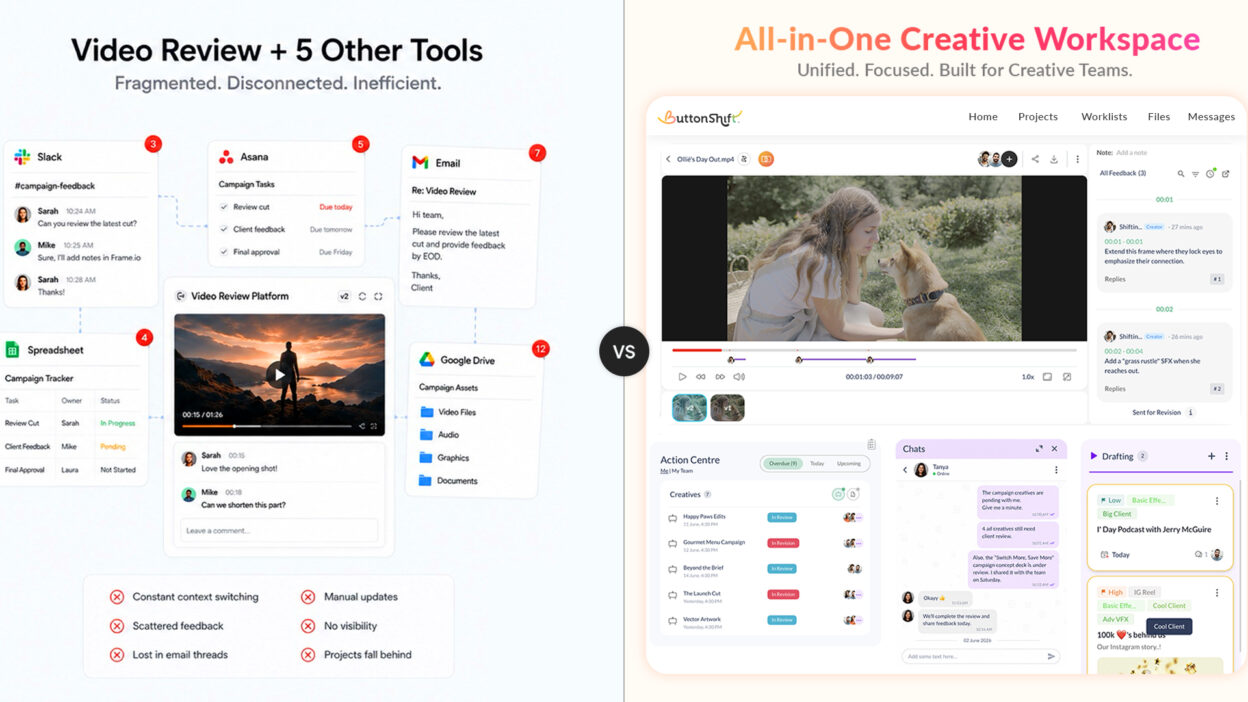
At some point, almost every growing agency runs into the same problem.
The team is producing great work. Clients are happy. New projects keep coming in.
But the workflow starts feeling heavier.
Feedback is happening in one place. Project updates are happening somewhere else. Files are stored in another tool. Approvals arrive through email. Internal conversations live in Slack. Nobody intentionally designed the process this way. However, the creative landscape has aggressively evolved. Today, a commercial campaign is rarely just a video file; it is an entire ecosystem of social media cutdowns, static graphics, thumbnail variants, and copy frameworks.
Let’s look at how the industry giant Frame.io, compares to ButtonShift – a platform built to treat your creative reviews, team conversations, and task tracking as one single continuous cycle.
ButtonShift vs Frame.io at a Glance
| Category | ButtonShift | Frame.io |
| Primary Focus | End-to-end creative workflow management | Creative review and approval |
| Best For | Creative teams, agencies, marketing teams, in-house design teams | Video production teams and filmmakers |
| Feedback & Annotations | Images, videos, documents, PDFs | Excellent video-focused feedback |
| Workflow Automation | Built-in workflows, approvers, creators | Basic approval flows |
| Project Tracking | Yes | No dedicated work management layer |
| Version Management | Version tracking and comparison | Strong video versioning |
| Team Collaboration | Feedback + tasks + approvals + communication | Primarily review and approval |
| Client Approvals | Yes | Yes |
| Asset Management | Moderate | Stronger for video assets |
| Ideal Use Case | Managing creative work from brief to delivery | Reviewing and approving creative files |
What Mid-Sized Creative Agencies Need Today
A few years ago, creative agencies mainly needed a place to share files and collect feedback. But today, the reality looks very different.
Now a days, agencies manage:
- Designers
- Video editors
- Content writers
- Freelancers
- Clients
- Marketing teams
- Multiple projects simultaneously
The creative review process is no longer a standalone activity. It’s connected to communication, approvals, project tracking, delivery timelines, and resource management.
That means agencies don’t just need video review software. They need a system that helps manage the entire creative workflow.
This is where many teams start questioning whether their current stack is helping them move faster or simply creating more places for work to live.
What Frame.io Does Really Well
It is impossible to walk through a post-production studio without tipping your hat to Frame.io. They changed the game, and they deserve their flowers for it. For traditional, hyper-focused post-production houses where long-form video editing is the only thing that matters, Frame.io is an exception.
Its real superpower is its deep, technical integration inside professional editing software. If your video editors spend eight hours a day living exclusively inside Adobe Premiere Pro, After Effects, or DaVinci Resolve, Frame.io feels like an extension of their own brain. They can see client comments appear as markers right on their local timeline, apply the fix, and export the next version without ever leaving their workspace.
But agencies rarely stop at feedback. And that’s where things get interesting.
Where Frame.io Starts Creating Friction for Growing Agencies
Frame.io is excellent at what it was built for: reviewing creative assets, especially video. But as agencies grow, creative work becomes much bigger than reviewing a single file.
You’re no longer managing one editor and one client. You’re coordinating designers, copywriters, video teams, account managers, freelancers, and stakeholders across multiple projects at once.
That’s where Frame.io’s narrow focus can start to feel limiting.
1. Reviews Live in One Place, Work Lives Somewhere Else
One of the biggest challenges agencies face with Frame.io is the disconnect between feedback and execution.
A client reviews a video and leaves ten comments. The feedback is clear, organized, and attached to the exact frames that need attention. So far, so good.
But what happens next?
Someone on the team still has to translate those comments into actual work. Tasks need to be assigned, priorities need to be updated, deadlines need to move, and team members need to know what’s changing. In many agencies, that means manually transferring feedback into project management tools, spreadsheets, chats, or task boards.
It’s a small process at first. But as projects multiply, those extra handoffs create opportunities for missed requests, duplicated work, and unnecessary admin time.
2. Modern Creative Work Is Bigger Than a Single Asset
Today’s campaigns rarely revolve around one video.
A single launch might include social media creatives, paid ads, landing pages, email designs, motion graphics, brand assets, and multiple video variations. All of these pieces need to move together.
Frame.io does a great job helping teams review individual assets. What it doesn’t provide is a broader operational view of how those assets connect to the larger campaign.
3. Agencies End Up Paying for Multiple Tools
Another challenge appears as agencies expand their client base and team structure.
Frame.io handles reviews. Then you need another platform for project management. Another for team communication. Another for approvals, documentation, or resource planning.
Before long, your workflow is spread across several subscriptions, several logins, and several systems that weren’t designed to work together from the start. The cost isn’t just financial. It’s operational.
Every additional platform introduces more context switching, more onboarding, more permissions to manage, and more chances for information to fall through the cracks.
How ButtonShift Approaches This Differently
ButtonShift was built on a refreshingly simple premise: creative teams shouldn’t have to piece together a patchwork digital tech stack just to push a single project across the finish line.
At its core is a frame-accurate review experience that gives editors and stakeholders the precision they expect. With the Feedback Tool, reviewers can pause a video at an exact frame, annotate directly on the creative, leave timestamped comments, and collaborate with teammates without lengthy email threads. And if an idea is too complex or nuanced to type out in a text box, users can record audio notes directly onto the frame.
The moment that feedback is left, it is already wired directly into your production pipeline through ButtonShift’s Workflow. From reviews to approvals, it’s one simple workflow and you get a bird’s eye view of the status of each creative. But creative work generally doesn’t stop after feedback arrives. Someone needs to:
- Own the task
- Track progress
- Monitor deadlines
- Manage approvals
ButtonShift Worklists act as your creative-first project manager, allowing you to assign specific roles to team members, set hard deadlines, apply custom labels, and track progress.
For agencies managing multiple clients and campaigns simultaneously, this creates far greater visibility.
To eliminate the distraction of external chat apps, ButtonShift builds real-time communication directly into your Boards, Worklists etc. through its Messaging tool. Your team can directly message teammates or spin up dedicated group chats right next to the project they are executing. Your everyday conversations stay permanently anchored to the context of the work being created.
Real Agency Scenario: Frame.io Workflow vs ButtonShift Workflow
To see how this structural difference impacts your studio’s daily velocity, let’s look at a common Tuesday afternoon scenario: a key client requests a handful of graphic corrections and color grading adjustments on a 30-second commercial cut.
The Frame.io Route
- The client opens the Frame.io link, drops five frame-locked comments pointing out the graphics changes, and closes the tab.
- Your producer gets a notification email, opens Frame.io, reads the comments, and manually types those requests into a new task card on your agency’s external project management tool or spreadsheet so the editor knows the work exists.
- The producer opens Slack or WhatsApp to ping the editor: “Hey, client just dropped notes on v1. Check the sheet for the breakdown.”
- The editor reads the Slack message, opens Asana to check the brief, opens Frame.io in their browser to view the visual drawings, applies the fixes in their editing software, exports v2, and uploads it back to Frame.io.
- Your team has just spent twenty minutes simply moving information across three separate applications.
The ButtonShift Route
- The client opens your shared ButtonShift Workspace, leaves frame-accurate feedback, and sends the file for revision.
- The editor is notified instantly, and the feedback is already attached to the asset, so there’s no need to copy notes into another tool.
- A comment can be converted into a task, assigned to a team member, and tracked through Worklists in just a few clicks.
- Once the revisions are complete, the editor uploads the new version to the same asset, keeping feedback, versions, and approvals connected.
- The project moves from review to approval within a single workspace, without bouncing between chat apps, spreadsheets, and project management tools.
What’s the win? Zero tool-switching, and a massive boost to your studio’s turnaround speed.
Pricing Isn’t Just About Subscription Costs
When comparing software, many teams focus only on subscription pricing. But the real cost often comes from workflow complexity.
Questions worth asking include:
- How many tools does the team need?
- How much time is spent switching between platforms?
- How difficult is onboarding?
- How much context gets lost during handoffs?
A platform may appear less expensive on paper while creating significant operational costs behind the scenes.
Which Platform Is Better for Different Agency Types?
Every creative team has its own unique operational DNA. Choosing the right tool comes down to looking honestly at your core deliverables and how your team naturally likes to work.
The Decision Rule: Are you an isolated video production house, or are you an integrated creative agency delivering complete multimedia campaigns?
Double Down on Frame.io If:
- Video review is your primary requirement
- You already have mature project management systems
- You only need a dedicated review and approval software
Make the Shift to ButtonShift If:
- You want reviews and workflow management together
- Your team struggles with context switching
- You want fewer tools in your stack
- You need visibility across projects
- You want communication, approvals, feedback, and work tracking in one place
- You want to protect your agency’s profit margins by taking advantage of highly flexible pricing models
Final Verdict
Look, Frame.io is a brilliant tool if your world starts and ends with video editing. If you are running a traditional post-production house that just needs a great digital screening room and a heavy-duty file archive, it’s a total powerhouse.
But most modern creative agencies don’t live in a video-only bubble anymore. To keep your studio moving fast, win bigger clients, and protect your sanity, you simply can’t afford to keep your creative reviews locked away from the rest of your daily project logistics.
That’s where ButtonShift steps in. It takes your frame-accurate video feedback, your daily task lists, and brings them all into one smooth workspace. It puts an end to the endless jumping between open tabs, keeps your conversations attached to the actual work, and gives you a streamlined approval flow so your team can focus on what they actually love: creating incredible things.